
Halloween nails, previewed on your hand
Find Halloween nail designs you would actually wear: tiny ghosts, black French tips, smoky burgundy or a pumpkin accent. Choose a look and upload one clear hand photo for an AI design preview. Sign in to generate; each image costs 10 credits. The examples are AI concepts, and your result can differ.
Selected template
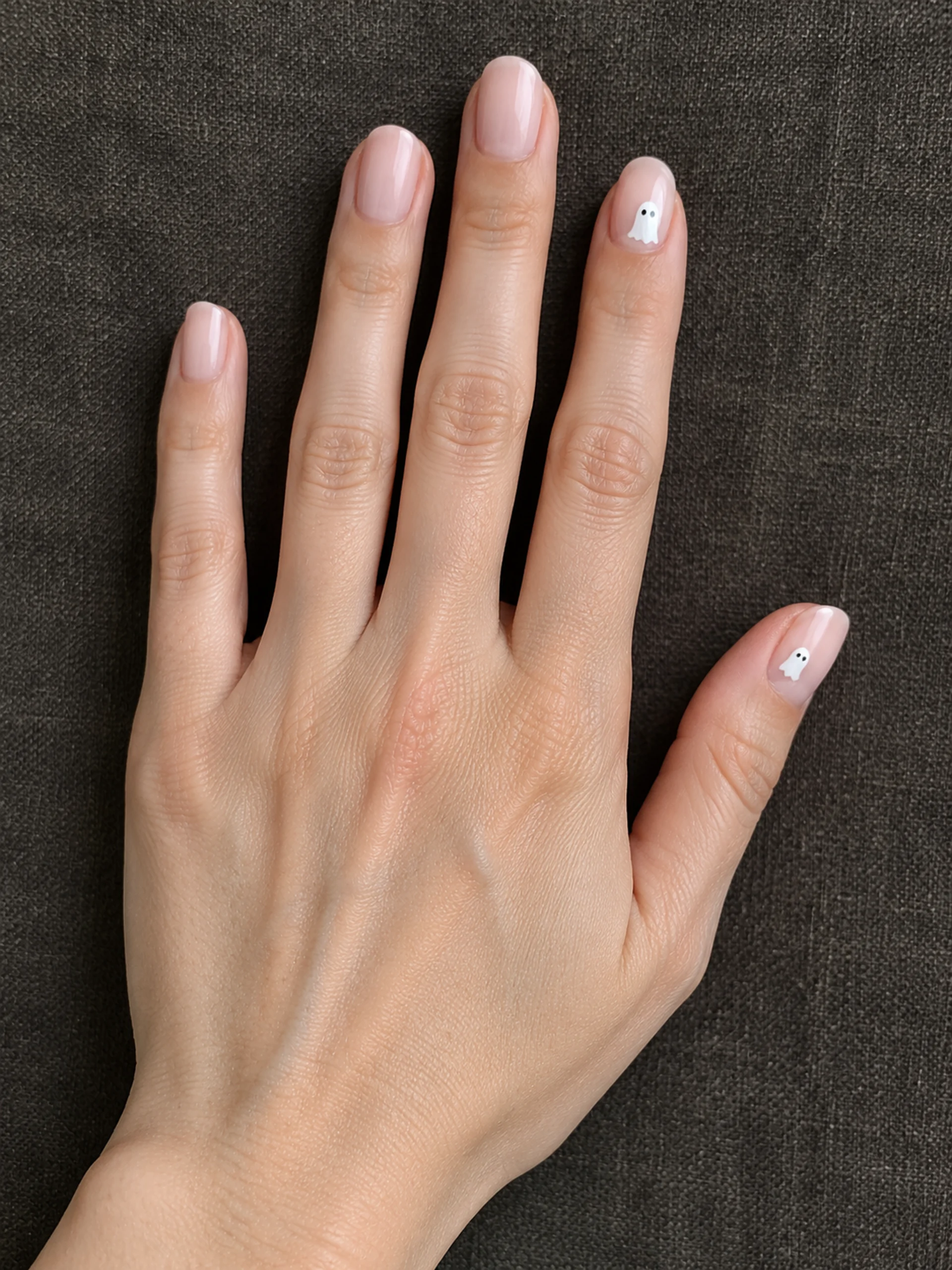
Selected template
10 credits · One hand photo
Checking availability…
Sign in to createOriginal concept covers, not guaranteed outputs. Each template has its own photo requirements.
Choose Halloween nails that fit your everyday style
Halloween nails can be a small seasonal detail rather than a full costume. Start with the amount of decoration you would enjoy wearing after the party. A nude base with one ghost feels different from an all-over spooky set, even when both use the same theme.
Our four templates give you a useful starting point. Milky ghost nails pair a sheer base with small white accents. Spiderweb French tips use a black edge and a fine web. Smoky burgundy blends wine-red wisps into a nude base. Pumpkin accents add burnt orange without covering every nail in a drawing.
Choose the design that suits the nails visible in your source photo. These previews aim to keep your current shape and length; there is no separate nail-extension or shape control. The template thumbnails show the intended look, not a promise that every tiny mark will appear in exactly the same place.
Short, simple or more detailed: decide before you generate
For short Halloween nails, give the artwork room to breathe. A little ghost or pumpkin can remain readable on a small nail, while a dense web may turn into indistinct lines. If you prefer simple Halloween nails, start with the milky ghost or pumpkin template and judge the result at its actual display size.
Black French tips give a neat outline to the design. Smoky burgundy is a useful option when you want darker color without a recognizable Halloween character on every finger. Think about the clothes and jewelry you already wear, rather than picking a design only because its thumbnail is dramatic.
The comparison below describes visual complexity, not a salon price or an estimated appointment time. A generated design does not measure how long hand painting will take. Ask your nail technician which details can be made smaller, simplified or replaced with a suitable sticker.
| Look | Visual detail | What to review |
|---|---|---|
| Milky ghosts | Small white accents on nude polish | Ghost outline and eyes |
| Spiderweb French | Black tips and one fine web | Thin lines and nail edges |
| Smoky burgundy | Wine-red wisps fading into nude | Soft gradient and skin boundary |
| Pumpkin accents | Burnt orange and a small pumpkin | Stem and accent placement |
A clear hand photo makes the preview easier to judge
Photograph one hand with the back facing the camera and the fingers gently separated. Include the thumb and keep the nail surfaces visible. Rest the hand on a plain background in soft daylight; avoid a clenched fist, a phone covering the fingertips or bright reflections across the polish.
Use a close photo of your actual nails instead of a full-body picture or a selfie. The tool edits visible nails; it cannot show you a reliable preview of a nail hidden behind another finger. Existing dark polish or bulky decorations may make small new patterns harder to distinguish.
Review the upload before generating. Keep the original file if you want to compare hand position and nail edges afterward. If you only want inspiration, you can browse the four AI concept examples without uploading. Creating a personalized result requires a hand photo and an account.
Save a useful reference for your nail appointment
Open your completed Halloween nails preview at a larger size. Check the finger count, nail outlines and skin around the cuticles before saving it. Inspect ghost eyes, pumpkin stems and web lines individually: a convincing small preview can hide blurred or invented details. AI can also change nail length, skin texture or jewelry despite instructions to preserve them.
Download the image and show it alongside your original hand photo. Tell your nail technician which parts matter most: the base shade, the accent finger, the black tip or the smoky finish. Discuss whether ordinary polish, gel, stickers or a simpler painted version would suit the result you want. This page provides a visual reference, not a product recommendation or application tutorial.
For a complete party look, explore the related makeup and costume tools below. Keep the manicure reference separate from those portraits so the small nail details remain easy to see.
How to create your result
- 01
Pick one of the four looks
Select a template in the studio. Read its input note and choose an output ratio that leaves the fingertips in frame. Use the same source photo when comparing different looks.
- 02
Upload your hand photo
Sign in, add one clear photo, then generate. The studio shows the credit cost and processing state. If a request encounters a problem, check your history before starting another generation.
- 03
Review, then download
Compare the finished image with the source. Save a result only after checking the hands and painted details. You can return to your creations later to find a completed preview.
Before you start: files, credits, and saved tasks
Privacy and image handlingGenerating an image costs 10 credits. Browsing templates is available before signing in; personalized generation requires an account and enough credits. Credits are separate from any physical manicure, nail supplies or salon booking.
Your photo is uploaded and sent through the configured image-generation service. Use a photo you have permission to edit and avoid including private information in the frame. Read the privacy policy before uploading. AI previews can differ from both your original hand and a real manicure.
Questions before you generate
Can I use the tool for short Halloween nails?
Yes. Upload your own short nails and choose a template. The instructions ask to retain their current length. Small accents are easier to assess than densely packed artwork, but AI may still change the outline. Review each nail before treating the image as a reference.
Is the Halloween nails generator free?
You can browse the examples without paying. Personalized image generation costs 10 credits per image and requires signing in. Check your available credits in your account. This tool does not include a physical manicure, press-on nails or a salon appointment.
Can I generate a design without uploading a photo?
Not in this tool. It uses one hand photo and a selected template; it does not accept a text-only idea or a second reference design. Browse the examples for inspiration, then upload a clear hand photo when you want a personalized preview.
Will the result look exactly like real nail art?
No. This is an AI image preview, not a live camera try-on or a guarantee of a particular finish. Polish color, reflections, fine lines and proportions can differ. Ask your nail technician how to adapt the design to your nails and available materials.
Can I change the color or paint each finger separately?
The four templates have preset palettes and patterns. There are no individual finger, custom color or nail-shape controls. Choose another template for a different look, or use the saved preview to explain specific changes to your nail technician.
Find the right Halloween tool
Choose a task first, then a style. Every tool below uses the same account and credit balance.