
Ramalama AI costume walk: reveal your Halloween look
Turn a full-body costume photo into a short walk and reveal. The Ramalama AI costume-walk template begins near the shoes, follows a couple of steps, and tilts upward to show the outfit. Upload one adult already wearing the look you want to animate. This is a five-second AI interpretation; exact footsteps, beat timing, and face consistency can vary.
Selected template

Selected template
60 credits · Kling 3.0 Turbo Pro · 1080p · 5 sec · native audio
Checking availability…
Sign in to createOriginal concept covers, not guaranteed outputs. Each template has its own photo requirements.
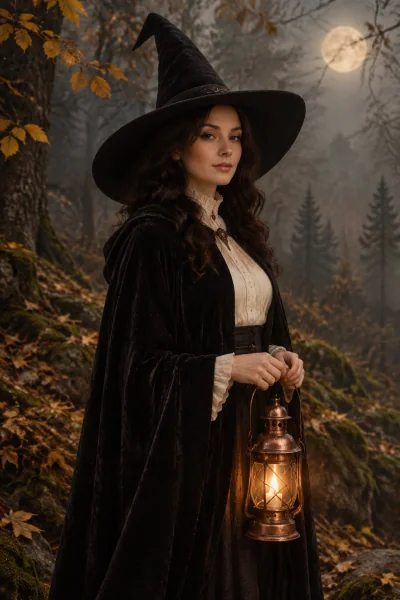
The costume walk is a camera move, not just a filter
The Ramalama Halloween format builds anticipation by starting low, near the legs and shoes, before revealing the complete costume. The outfit is the reveal. A still photograph with camera zoom alone does not reproduce that action, and a blink in an existing portrait is a different effect. This recipe asks for walking motion, an upward tilt, and a final pose in one continuous shot.
The Ramalama AI trend name on this page refers to the social-video format associated with Ramalama (Bang Bang). It is unrelated to the similarly named local AI software project. The generated clip is a short interpretation made from your photograph; it is not motion capture, a frame-accurate recreation of a creator's performance, or a guarantee that a particular social post can be copied exactly.
Start with the costume already visible
Upload a clear full-body photograph of one adult wearing the outfit you want in the clip. Keep both shoes, legs, hands, and the face visible where possible. A stable standing pose gives the video model more useful information than a tight selfie or an action photograph with overlapping limbs. Leave some space around the person so the upward reveal has room to frame the costume.
This template asks the model to preserve the uploaded outfit while adding movement. It does not dress an ordinary selfie in a separately chosen costume. To change clothes first, create a costume portrait with the image tools, then use a suitable full-body result as a new reference. Those are separate tasks and charges. If you want the clothing change itself on screen, use the costume-transition page instead.
Five seconds, one person, a clear finish
The recipe fits the sequence into a five-second clip: a low view of the footwear, two deliberate steps, an upward camera reveal, and a short ending pose. That is a compact version of a format that creators may film over a longer period. The generated motion can vary and may simplify the requested action. Review the complete clip rather than assuming the last frame represents the whole result.
Pay particular attention to knees, ankles, shoe contact, and whether the face changes during the tilt. Moving a hidden part of the body into view asks the model to infer detail. A single-person reference with an uncomplicated silhouette is the intended input. Couples, synchronized groups, pets, elaborate acrobatics, and multiple costume changes are outside this template's described workflow.
Add the sound and publish on your own timeline
The generation does not include the licensed Ramalama recording or guaranteed synchronization to that track. The recipe requests environmental ambience rather than music or speech. Add the available sound in your social publishing app and align the reveal manually. Check which audio options are available for your account and destination before you plan a specific timing. You can also publish the clip without a song.
Use the vertical framing of your source photograph for a story or Reel, and leave space away from the face for captions and interface controls. The video model may retain or reframe the source canvas. Watch the downloaded file from beginning to end to check movement and framing. The cover on this page is a costume concept image, not a recorded demonstration of a generated walk.
How to create your result
- 01
Choose a single full-body costume photo
Sign in, select the costume-walk template already shown above, and upload one supported photo. The reference should include the complete existing outfit and footwear. You can use a finished image you previously created, but download it first and upload it as the walk reference. This workflow does not automatically purchase or generate a preparatory costume image.
- 02
Review the action and cost before starting
The workspace displays the video generation credit cost. Confirm that you want to animate the outfit already in the photo, rather than transform ordinary clothes into a different costume. The recipe requests one short continuous sequence. There is no prompt field, choreography editor, soundtrack picker, or guarantee of an exact frame-by-frame camera move.
- 03
Watch, download, and align the reveal
Start one task and wait for its status to update. Review the complete result, especially moving legs, the camera tilt, and facial stability. Download the clip and add sound or captions in your publishing app. If the task appears interrupted, check My Creations before submitting again; a second click should not be your first way to check an existing task.
Before you start: files, credits, and saved tasks
Privacy and image handlingThe uploader accepts JPG, PNG, and WebP images up to 10 MB each, with a minimum of 256 pixels on both sides. Use a sharp original rather than a screenshot of a compressed social post. Sign in before uploading. The preview lets you confirm the selected reference; selecting a template or browsing its concept cover does not itself start a generation.
The workspace shows the cost before submission: image tasks use 10 credits and video tasks use 60 credits. Credits are purchased separately; a free completed result is not promised. Once a task is submitted, its processing and result states appear in the workspace and My Creations. Follow the shown failure or refund status. If a request is uncertain or the connection breaks, check the saved task before creating another one.
Uploaded references are processed through the configured AI and storage services. This is not an offline editor or a promise that photos stay only in your browser. Use images you are allowed to edit and read the privacy policy for the data-handling terms. Generated imagery can contain mistakes; inspect identity, anatomy, and scene details before you download or publish a result.
Questions before you generate
Does this turn everyday clothes into a costume?
No. This template is for animating a costume that is already visible in your reference photo. It requests that the existing outfit remain consistent while the person walks and the camera tilts upward. For an on-screen change from everyday clothing into a witch costume, use the separate Halloween costume-transition tool. Creating a costume image first is another separate task.
Is the original Ramalama music included?
No licensed song is bundled with the generation. The prompt asks for environmental ambience and no music, speech, or singing. Audio output can still vary by the configured model, so review it before posting. Add an available official sound in the destination app and adjust timing yourself; the video does not arrive with guaranteed beat alignment.
Can I make a group, couple, or pet walk?
This recipe is intended for one adult in one full-body photo. It does not assign multiple identities, coordinate a group, or animate animal walking anatomy. A photograph containing several people does not add those capabilities. Use a clean solo reference so the model has one consistent subject and a clearly readable costume silhouette throughout the reveal.
Will the footsteps match a reference TikTok exactly?
No. The tool generates motion from an image and a written action recipe; it does not accept a source performance video, track its pose, or preserve exact choreography. The five-second clip may simplify the sequence. Judge whether the walking motion, reveal, and face are usable, and edit the post around the result instead of expecting an identical creator performance.
Find the right Halloween tool
Choose a task first, then a style. Every tool below uses the same account and credit balance.