
Pumpkin head AI generator for your autumn photoshoot
Skip the heavy pumpkin and make a Halloween portrait from a full-body photo. This pumpkin head AI generator replaces the head with a carved jack-o-lantern while using your body shape and outfit as references. Your face is intentionally hidden. Choose this look for an autumn post, a playful profile image, or a pumpkin-field photoshoot.

Original concept covers, not guaranteed outputs. Each template has its own photo requirements.
A pumpkin-head photo starts with the right silhouette
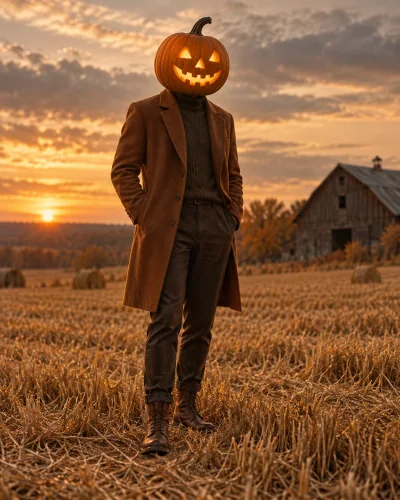
A pumpkin head photoshoot works because an ordinary outfit sits beneath an impossible head. The carved face and warm light tell the seasonal story, while your stance and clothes keep the image personal. Our template places that character in a dusk pumpkin field. The aim is a complete staged photograph, with a coherent horizon and body proportions, rather than a pumpkin sticker pasted onto a selfie.
The AI pumpkin head photoshoot template is shared with the homepage. One clear reference is enough to begin. You do not need to cut a real pumpkin, balance it on your head, or arrange a photographer. The illustrated cover shows the intended visual direction. Your generated pose, clothes, background, and pumpkin carving can still differ from that concept image.
Why a full-body reference matters
Choose a photograph that includes the body, legs, and shoes, with space around the head. A simple standing pose is easier to interpret than crossed limbs, a crouch, or a cropped shoulder selfie. Avoid a very busy background or another person partly entering the frame. The template is designed for one reference person, so an existing group photo is a poor starting point.
Your face is not the identity anchor in this effect because it is deliberately replaced. Judge whether the body shape, stance, clothes, and shoes still feel like you. The recipe asks to preserve them, but this is a generated photograph rather than an exact cutout. If the outfit itself is the point of the photo, inspect every important garment before sharing.
Pick a crop before you generate
For a pumpkin head portrait, a taller frame helps show the outfit and the contrast between the head and body. A square crop can suit an avatar, but the pumpkin may occupy most of the result. A vertical story leaves space for the autumn setting. Choose the aspect ratio in the workspace before submitting so the scene is composed for the intended format.
After generation, check the neck connection, hands, pumpkin opening, and direction of light. The glow should appear to come from inside the jack-o-lantern. Look at the feet and ground contact as well; a floating shoe can make an otherwise convincing autumn portrait feel wrong. A photo can be playful without needing extra fog, text, or a heavily orange color cast.
Single portraits, couples, and pumpkin videos
Searches for pumpkin head photoshoot ideas often include couples holding hands or friends standing on a leafy road. Those are useful composition ideas, but this page currently offers the single-person pumpkin-head recipe. Do not upload two people and expect separate bodies, clothing, or head replacements to be assigned correctly. Use a template specifically built for two references when you want a duo.
For a moving jack-o-lantern, first create or upload a finished pumpkin-head scene in the video tool. Its pumpkin-motion option adds a small tilt and candle flicker while keeping the head covered. That is different from filming the moment a human head becomes a pumpkin. A still-photo generation here does not automatically buy or create a second video task.
How to create your result
- 01
Choose one standing photo
Start with a full-body reference of one person in an uncomplicated pose. Sign in, upload the image, and confirm that shoes and the upper body remain visible in the preview. A casual outfit works well because the contrast with the pumpkin head carries the concept. Use a picture that you own or are allowed to edit.
- 02
Review the pumpkin-head setting
The correct template is already selected. Choose a square, portrait, or taller story frame and review the displayed credit cost. This effect is designed to conceal the face, so do not select it if you need a recognizable facial portrait. There is no separate prompt to write and no need to upload a pumpkin photograph.
- 03
Check the replacement and save
Submit once, wait for the result state, and examine the pumpkin-to-body join and body anatomy before downloading. If a task takes longer than expected, return to My Creations rather than starting another copy. Keep the output that suits your post; a new generation is a separate paid task with potentially different visual details.
Before you start: files, credits, and saved tasks
Privacy and image handlingThe uploader accepts JPG, PNG, and WebP images up to 10 MB each, with a minimum of 256 pixels on both sides. Use a sharp original rather than a screenshot of a compressed social post. Sign in before uploading. The preview lets you confirm the selected reference; selecting a template or browsing its concept cover does not itself start a generation.
The workspace shows the cost before submission: image tasks use 10 credits and video tasks use 60 credits. Credits are purchased separately; a free completed result is not promised. Once a task is submitted, its processing and result states appear in the workspace and My Creations. Follow the shown failure or refund status. If a request is uncertain or the connection breaks, check the saved task before creating another one.
Uploaded references are processed through the configured AI and storage services. This is not an offline editor or a promise that photos stay only in your browser. Use images you are allowed to edit and read the privacy policy for the data-handling terms. Generated imagery can contain mistakes; inspect identity, anatomy, and scene details before you download or publish a result.
Questions before you generate
Can the pumpkin head keep my face visible?
No. The defining effect replaces the whole head with a carved pumpkin and intentionally removes the visible human face. If you want people to recognize your face, choose a witch, vampire, or horror-phone portrait instead. A pumpkin mask with a human face window is a different composition and is not what this template is designed to produce.
Can I use a selfie instead of a full-body photo?
You can upload a supported image, but a close selfie gives the model little information about your body, clothing, or shoes. It may have to invent those details. A full-body reference is the better fit for this page. If you only have a selfie and need the outfit preserved, take a new standing picture before generating.
Does this preserve the exact background?
No. The template builds an autumn pumpkin-field scene around the reference. Original surroundings, small accessories, clothing details, and lighting may change. Treat the result as an AI photoshoot rather than an original photograph with one guaranteed local replacement. Check the download closely if an item of clothing or a particular body detail matters to you.
Is a couple version included in one generation?
This page is a single-person tool and the displayed price covers one image task. It does not include a two-person session or a follow-up video. Duo photos need a dedicated two-reference workflow; combining uploads into a collage does not reliably create that support. Browse the homepage for the templates and subject counts currently offered.
Find the right Halloween tool
Choose a task first, then a style. Every tool below uses the same account and credit balance.