
Pet Halloween photo generator for cats and dogs
Give your cat or dog a digital Halloween outfit without dressing them in a real costume. Choose a witch hat, a soft pumpkin suit, or a sheet ghost look, then upload one clear pet photo. The pet Halloween photo generator uses breed, face, fur color, and markings as references while creating a new seasonal portrait.

Original concept covers, not guaranteed outputs. Each template has its own photo requirements.
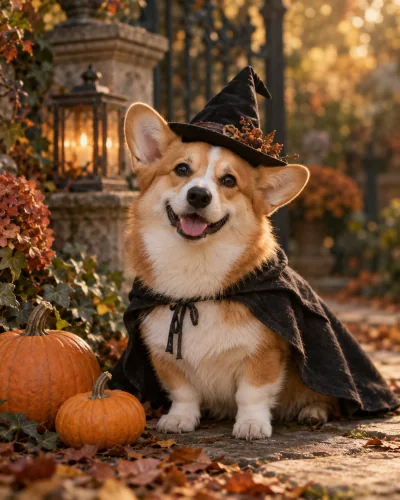
Choose a costume that suits your pet photo
The three styles on this page have different silhouettes. A witch hat and miniature cloak leave most of the face and coat visible. A pumpkin outfit adds a soft rounded shape around the body. A sheet ghost covers more fur and adds sunglasses, so the visible muzzle, paws, and tail become especially important. Select the costume before uploading so the reference fits the look.
A dog Halloween photo generator and a cat Halloween photo generator need the same basic starting point: one clearly identifiable animal. You do not need to purchase or put on a physical costume. The image editor generates clothing and a setting around the reference. Our covers are AI concept illustrations, not before-and-after proof that every breed, coat, or pose will produce the same result.
Keep the eyes, markings, and natural body readable
Choose a photo with good light on the face, visible eyes, and enough of the body to understand the pose. A pet sitting or standing on its own is easier to interpret than a curled sleeping animal under a blanket. Keep another animal out of the frame. If an ear or tail is hidden in the reference, the model may need to infer it.
The recipe asks to preserve breed, coat colors, markings, face, and anatomy. It cannot guarantee every patch of fur remains identical. Look for the familiar muzzle shape, ear position, eye color, and distinctive markings in the result. Count visible paws and examine the tail. A cute costume is not a good result if it changes the animal into a different-looking pet.
Make a seasonal portrait worth keeping
For an autumn profile picture, choose a crop that gives the face enough room. For a full costume portrait, use a taller frame with the paws visible. A dog in a pumpkin suit may need more horizontal room than a cat wearing a hat. You can adjust the image aspect ratio in the workspace before generating, rather than relying on a heavy crop afterward.
The template builds a warm seasonal setting, so the original room, furniture, collar details, and lighting may change. Avoid adding printed signs or expecting accurate lettering on costume fabric. This tool is aimed at the portrait itself. Once you download the image, add any greeting or caption in the publishing app so words remain readable and do not compete with your pet's face.
One pet per reference, with clear expectations
This page supports one pet in one uploaded photo. It is not a multi-pet family portrait or a person-and-pet identity-combination tool. Uploading a photo that contains both you and your dog does not create a supported two-subject recipe. Photograph the pet alone for the clearest reference. Cats and dogs are the intended subjects; other species are outside the described workflow.
Digital costumes avoid the need to keep a real animal still in unfamiliar clothing, but the output is still an invented scene. Do not present it as evidence of a costume fitting your pet in real life. A generated portrait can also become the basis for a later animation task, but no walking pet or costume-transition video is included in this image generation.
How to create your result
- 01
Select witch, pumpkin, or sheet ghost
Review the costume cards above and choose the one that leaves the features you care about visible. Sign in and upload one JPG, PNG, or WebP photo of a single cat or dog. The preview should show a readable face and enough body for the chosen outfit. You do not need to supply a costume reference.
- 02
Review your frame and credit balance
Select the image aspect ratio and check the price shown in the workspace. Each generation produces a separate portrait task. The same template, input requirements, and credit cost apply whether you start here or on the homepage. Picking a different costume changes the recipe, so confirm the selected label before you submit the image.
- 03
Check the animal before downloading
Wait for the task result and compare the face, coat pattern, ears, paws, and tail with the original photo. Download only after checking the anatomy and costume fit. If a request appears slow or disconnected, check My Creations before submitting again. A different well-lit reference may be more useful than another attempt with a heavily obscured pet.
Before you start: files, credits, and saved tasks
Privacy and image handlingThe uploader accepts JPG, PNG, and WebP images up to 10 MB each, with a minimum of 256 pixels on both sides. Use a sharp original rather than a screenshot of a compressed social post. Sign in before uploading. The preview lets you confirm the selected reference; selecting a template or browsing its concept cover does not itself start a generation.
The workspace shows the cost before submission: image tasks use 10 credits and video tasks use 60 credits. Credits are purchased separately; a free completed result is not promised. Once a task is submitted, its processing and result states appear in the workspace and My Creations. Follow the shown failure or refund status. If a request is uncertain or the connection breaks, check the saved task before creating another one.
Uploaded references are processed through the configured AI and storage services. This is not an offline editor or a promise that photos stay only in your browser. Use images you are allowed to edit and read the privacy policy for the data-handling terms. Generated imagery can contain mistakes; inspect identity, anatomy, and scene details before you download or publish a result.
Questions before you generate
Does the pet need to wear a real costume?
No. The uploaded photo is an identity and anatomy reference; the outfit is created digitally. A plain photo of your pet on its own is usually a more useful starting point than a busy costume photo. This does not demonstrate that the generated outfit exists, fits the animal, or would be comfortable for it in real life.
Will my cat or dog keep the same markings?
The recipe explicitly asks to preserve coat colors and markings, but generative editing may alter fine fur details. Compare the result with the original reference, especially distinctive patches, eye color, muzzle shape, and ear position. A blanket promise of perfect breed or identity preservation would be misleading. If a marking is essential, inspect the downloaded image at full size.
Can I upload two pets or a family photo?
This page is built for one animal in one reference. A multi-pet or person-and-pet scene needs a recipe that assigns each identity and body separately. A collage does not add that capability. Use a clear photo of the single animal you want to dress, and keep other people and pets outside the frame where possible.
Is a pet Halloween video included?
No. The cost displayed here covers an image task. A video is a separate workflow with its own input and credit cost. The simple scene-animation options do not promise a pet costume walk or a change of outfits. Download the still portrait first, then choose a video tool only if its described action matches what you want to create.
Find the right Halloween tool
Choose a task first, then a style. Every tool below uses the same account and credit balance.