
AI Halloween costume transition: everyday clothes to witch
Create a short transformation from an ordinary outfit into a forest-witch costume. Upload one photo of a single adult with a visible face and upper body. A sweep of autumn leaves masks the clothing change before the final look settles. This five-second AI Halloween costume transition recipe aims to retain the same person; exact face details and transition timing can vary.
Selected template

Selected template
60 credits · Kling 3.0 Turbo Pro · 1080p · 5 sec · native audio
Checking availability…
Sign in to createOriginal concept covers, not guaranteed outputs. Each template has its own photo requirements.
A real transition needs a beginning and an ending
A Halloween outfit transition is a moving change between two appearances. The first moment establishes the ordinary outfit, a visual cover gives the change a place to happen, and the final pose shows the costume. This page requests that sequence from one reference photo. It is different from creating a finished witch photograph and then adding a blink or a small camera move.
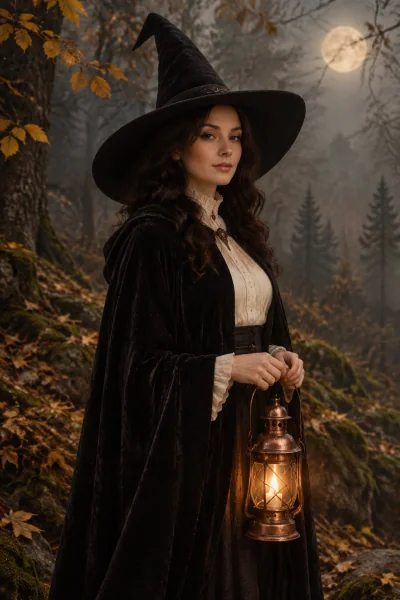
The current endpoint look is intentionally specific: an original dark forest-witch costume, pointed hat, and textured cloak. A swirl of autumn leaves briefly passes across the torso to mask the clothing change. This is not a general-purpose editor where you upload a second outfit, pick a transition duration, or type any costume you can imagine. The recipe has one defined transformation so you can judge its fit before submitting.
Prepare a photo that leaves the face visible
Use one adult in ordinary clothes, with even light and the upper body clearly shown. A standing or waist-up reference works better than a face-only crop because the clothing needs enough visible area to transform. Avoid hands covering the face, a hood pulled over the eyes, or another person partly in the background. A simple pose helps keep the body readable during the effect.
The recipe asks the model to retain the same face, age, skin tone, and body proportions throughout. It cannot lock each feature to the original pixels. Look for changes around the jaw, eyes, and hairline as the leaves cross the frame. If your reference already has an elaborate costume, the before-and-after change may be less clear; start with plain everyday clothing for a more understandable reveal.
What the five-second reveal is designed to do
The requested sequence briefly holds the original appearance, brings autumn leaves across the torso, reveals the witch outfit, and finishes in a stable pose. A continuous scene makes the before and after easy to compare. The camera is not meant to cut to a different person or a separate fashion shoot. Movement, leaf placement, and the exact moment the clothes change may vary with generation.
Watch the hands and body outline during the covered part of the clip. A convincing last frame does not make the entire transition usable if the face morphs halfway through. This tool does not provide manual masks, frame-by-frame repairs, a second destination image, or a professional compositing timeline. If you require exact garment matching, fixed choreography, or guaranteed pixel-level identity, use a controlled editing workflow instead.
Use the right tool for the final post
Choose this page when the act of changing outfits is the point of the video. If you simply want an attractive witch portrait, use the image generator and avoid paying for motion you do not need. If your costume is already complete and the reveal should come from walking toward the camera, the Ramalama costume-walk tool is a closer match. Each workflow has its own reference requirements.
The prompt requests environmental ambience without music, narration, or dialogue. It does not include a trending soundtrack or automated beat matching. Add an available sound and captions after downloading, keeping text away from the face and platform controls. The template cover is an AI costume concept; it is not a filmed before-and-after demonstration or proof that every photo will transform with the same motion.
How to create your result
- 01
Upload one ordinary-outfit photograph
Sign in and upload a supported photo of one adult. Keep the face and upper body visible and choose an uncomplicated pose. The witch-transition recipe is already selected above. You do not need to upload a second costume image, and the tool will not ask you to write a prompt or specify a target character.
- 02
Confirm the fixed costume and video cost
Review the forest-witch destination and displayed credit cost before starting. The generation is one short video task, not a bundle of every Halloween outfit. The workspace handles the same upload, task status, and account flow used on the homepage. A different costume is not selected by changing the file name or uploading a collage.
- 03
Check the entire transformation
After the task finishes, play the clip through from the original outfit to the final pose. Check facial stability, hands, body shape, and whether the leaf cover makes the change readable. Download the file if it fits your post. If the connection drops, check My Creations for the current task before starting another paid attempt.
Before you start: files, credits, and saved tasks
Privacy and image handlingThe uploader accepts JPG, PNG, and WebP images up to 10 MB each, with a minimum of 256 pixels on both sides. Use a sharp original rather than a screenshot of a compressed social post. Sign in before uploading. The preview lets you confirm the selected reference; selecting a template or browsing its concept cover does not itself start a generation.
The workspace shows the cost before submission: image tasks use 10 credits and video tasks use 60 credits. Credits are purchased separately; a free completed result is not promised. Once a task is submitted, its processing and result states appear in the workspace and My Creations. Follow the shown failure or refund status. If a request is uncertain or the connection breaks, check the saved task before creating another one.
Uploaded references are processed through the configured AI and storage services. This is not an offline editor or a promise that photos stay only in your browser. Use images you are allowed to edit and read the privacy policy for the data-handling terms. Generated imagery can contain mistakes; inspect identity, anatomy, and scene details before you download or publish a result.
Questions before you generate
Can I choose any Halloween outfit?
This first transition recipe has one defined destination: an original forest-witch look with a pointed hat and cloak. There is no free-text costume input or second reference image on this page. Browse the photo templates for other static outfits, or use the costume-walk tool if you already have the exact look you want to animate.
Will the face remain exactly the same in every frame?
The recipe asks for identity consistency, but generated video can alter facial details, hair, hands, or body shape as motion develops. Check the full clip, especially the moment leaves cross the torso. A sharp source photograph is useful, but it does not make pixel-perfect identity preservation a guarantee. Do not judge only the thumbnail or final frame.
Can I transform two people together?
The described workflow uses one person in one reference photo. Coordinating separate outfits and identities for two people would need a different recipe and input contract. A couple photo or a stitched collage is not a supported shortcut. Crop or photograph the intended single subject clearly, without another face competing for attention in the scene.
Does the clip include music or an editable timeline?
No soundtrack library, licensed song, beat-sync control, or timeline editor is included here. The recipe requests natural ambience and no music or speech, with output depending on the configured model. Download the result and use your own publishing or editing app to adjust sound, captions, and timing. The generated clothing change itself cannot be edited frame by frame in this workspace.
Find the right Halloween tool
Choose a task first, then a style. Every tool below uses the same account and credit balance.