Skip to the generator

Gemini AI Halloween prompts for photos, ready to adapt

Copy an original Halloween photo prompt, add a clear reference, and adjust the scene to suit your picture. These examples cover visible-face portraits, pumpkin heads, sheet ghosts, and pets. Copying is free and requires no login. Generating in another service follows that service’s rules; using a matching template here is a separate credit-based workflow.

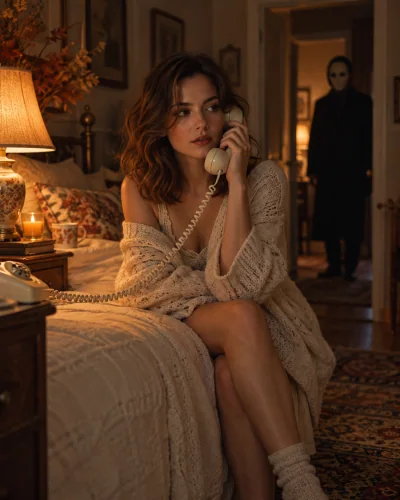
Y2K horror phone portrait

Using my uploaded portrait as the identity reference, create an editorial Halloween photograph of the same adult in a retro bedroom at night, holding a cream corded telephone. Preserve recognizable facial features and skin tone. Add a warm bedside lamp and an original masked silhouette standing far away in a dim doorway. Keep the foreground calm and the background suspenseful, with believable hands and telephone geometry. Portrait framing, subtle analog grain, no gore, logos, captions, or text.
Pumpkin head autumn portrait

Use the uploaded full-body photograph as the reference for one person. Preserve the overall body shape, standing pose, clothing, and shoes as closely as possible. Replace the entire head with a carved jack-o-lantern glowing from inside; do not show or invent a human face. Place the subject in a quiet pumpkin field at dusk with believable ground contact and soft autumn light. Keep one subject, natural hands and limbs, no floating objects, lettering, logos, or watermark.

Sheet ghost on an autumn path

Create a full-body autumn photograph from the uploaded single-person reference. Cover the head and torso with a naturally draped white sheet and dark sunglasses. Intentionally hide the face. Retain the reference body proportions and visible trousers and shoes. Place the sheet ghost on a leafy path with soft overcast light and a simple background. Keep a plausible fabric outline and the correct number of limbs. No background people, floating body parts, text, or watermark.

A pet in a pumpkin costume

Use the uploaded photo of one cat or dog as the identity reference. Create a warm autumn editorial pet portrait wearing a soft pumpkin costume, with the face and natural paws visible. Preserve the animal breed, muzzle shape, eyes, coat color, and distinctive markings as closely as possible. Add a few small pumpkins in a simple photography studio. Keep natural animal anatomy and a believable tail; no extra paws, human hands, costume lettering, brand logos, or watermark.

Halloween photo prompts — AI concept illustration · not a guaranteed result
AI concept illustration · not a guaranteed result

Gemini AI Halloween prompts: start with the reference

A useful Halloween prompt tells the image tool which details come from the reference and which details should be invented. Upload a clear photo when the result should resemble a real person or pet. Then name the scene, costume, lighting, crop, and features that should stay recognizable. A mood word such as spooky does not specify whether you want a visible face, a sheet-covered head, or a pumpkin replacing the face.

These original Gemini AI Halloween prompts are written for photo-reference workflows. You can copy them without signing in here, adjust the details, and use a compatible image tool under its own account and content rules. They are not copied community submissions or official Google templates. This site is independent, and using our generator does not send a prompt through your personal Gemini account. In an image tool that accepts a photo reference, upload your picture, paste one prompt, and adjust the scene and crop before submitting. The selected service controls its own account requirements, limits, and charges.

Write constraints that match the effect

For a visible-face portrait, ask for the same face shape, skin tone, and recognizable features, but do not assume those words guarantee identity. For a pumpkin head or a sheet ghost, explicitly say the face is hidden; asking for an unchanged visible face at the same time sends conflicting instructions. For a pet, describe coat markings and natural limbs instead of asking for human anatomy.

Keep the first attempt simple. One subject, one scene, one lighting direction, and one clear costume are easier to evaluate than a crowded list of movie characters. If the result is wrong, identify the specific problem before rewriting the entire prompt. A different sharp reference may help more than repeating a long list of demands. Check what your chosen tool supports before expecting multi-photo identity matching or local editing.

Choose an image prompt or a video workflow

These prompts describe still photographs. They do not create a costume walk, a moving reveal, or a transformation sequence just because you add cinematic to the wording. Image-to-video needs a motion-capable tool and an action description. A finished costume photo is useful for a walk; an ordinary-outfit reference is the starting point for our fixed witch transition. Those are separate user tasks.

If you prefer a template, use the matching link beside each prompt. Our generator preselects a reviewed scene recipe and asks for your reference rather than arbitrary prompt text. The prompt itself remains available on this page without a purchase. You are choosing between editing the words in another tool and using a preset workflow here, not paying to unlock the answer to a prompt question.

Before you use a prompt: free copying, photos, and privacy

Privacy and image handling

All four original prompts are readable and copyable without signing in. Copying does not upload a photograph or start a generation. In an image tool that accepts photo references, upload a picture you may edit and paste one prompt. Keep the subject and identity instructions, then change the scene details you need. Check that service’s supported file formats, image sizes, account requirements, and usage limits.

The matching-template links open our preset generator, which uses its own scene recipe rather than arbitrary text you edited elsewhere. Submitting a task there requires signing in and uses the displayed credits: 10 for an image or 60 for a video. Free access here covers reading and copying the words. It does not promise free generation in another service or a free finished result from our tools.

Reading or copying this page requires no reference-photo upload. Before sending a photo to another service, review that service’s image-handling and privacy terms. Our template workflows process uploaded references through configured AI and storage services. Prompt wording cannot guarantee exact identity, coat markings, or anatomy. Review the generated result before downloading or sharing it.

Questions about using Halloween prompts

Are these official Gemini prompts?

No. These are original examples written for common Halloween photo tasks. They are not endorsed Google templates, and this website is not affiliated with Gemini. A compatible image tool may interpret the wording differently or decline an input under its own rules. Read the current documentation and photo-upload terms of the tool you choose before using a reference image.

Why does my generated face look different?

A small, filtered, blurred, or partly covered reference can make identity harder to follow. Use a clear image, specify only the necessary changes, and compare the result with the source. Written identity instructions are useful constraints, not a guarantee. Do not ask a pumpkin-head or sheet-ghost prompt to preserve a visible face when the intended effect explicitly hides it.

Can I edit these prompts or use ChatGPT instead?

Yes, you can adapt the original wording to your own scene and use a tool that supports the required reference-image workflow. Features, account limits, and content rules differ between services. Keep the essential subject and identity instructions, then change one creative detail at a time. These examples are not a claim that every model accepts identical instructions or produces matching results.

Is copying a prompt the same as starting a generation?

No. Copying the text on this page is free and does not upload a photo or start a task. A matching template link takes you to our upload workflow, where signing in and submitting a task uses the displayed credits. Our generator uses its reviewed recipe rather than accepting the arbitrary text you edited in another application.

All Halloween templatesBack to the prompts

Choose a task first, then a style. Every tool below uses the same account and credit balance.