
AI sheet ghost photoshoot with a white sheet and shades
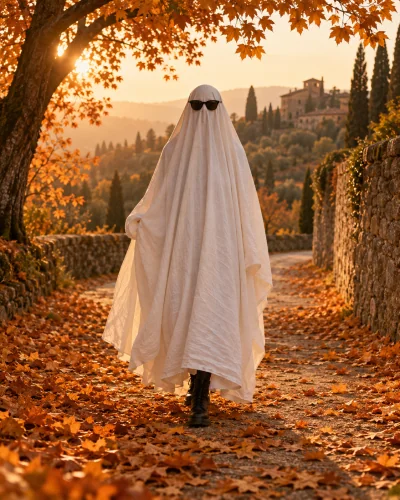
A white sheet, dark sunglasses, and an autumn path: make the familiar ghost photoshoot look from one reference photo. This AI sheet ghost photoshoot template intentionally covers your face and torso. Body proportions, visible trousers, and shoes provide the personal details. Use a clear standing photograph for a playful Halloween portrait without arranging a physical shoot.

Original concept covers, not guaranteed outputs. Each template has its own photo requirements.
What makes a sheet ghost photoshoot recognizable?
This look is about a costume silhouette rather than a visible face. A loosely draped white sheet becomes the character, sunglasses add expression, and ordinary shoes make the ghost feel amusingly human. Autumn leaves or a quiet outdoor path provide context without overwhelming the subject. The template generates that complete arrangement from your reference photo. It is not a transparent spirit filter.
An AI ghost photoshoot also differs from adding a ghost behind someone. Here you become the sheet-covered subject. A horror-phone portrait keeps your face visible with a separate background figure; this effect hides the face on purpose. Decide which of those outcomes you want before you upload. The concept cover shows the intended costume and framing, not a guaranteed result for every photograph.
Bring enough of the body into the reference
Use a standing photo that includes your legs and shoes, with a little space around the outline. Avoid holding large objects across your body, sitting behind a table, or standing shoulder to shoulder with another person. Those details make it harder to infer where the sheet should hang. A simple background and even lighting help the editor separate the person from the surroundings.
The recipe asks to retain body proportions and visible original trousers and footwear. Because the head and torso are concealed, exact facial identity is not a meaningful success check here. Inspect how the sheet drapes, whether the sunglasses sit plausibly, and whether the visible legs still fit the body. This is a generated scene, so small outfit details may still change.
Ghost photoshoot ideas that fit this tool
A portrait on a leafy path is the default direction. A tall frame works well when you want the shoes and autumn setting to read clearly on a phone. A square frame can make a simple Halloween profile picture, although it leaves less room for the costume. The same single-person template is available on the homepage, so you can move between this focused guide and the broader gallery.
Friends, couples, and pets are popular variations of the visual idea, but subject count is a real input requirement. This page accepts one person. For a ghost cat or dog, use the pet Halloween page and its dedicated costume recipe. Do not put a person and a pet into one reference and assume a single-subject recipe can preserve both correctly.
Decide between a photograph and gentle motion
If you want a still image, generate it here and download the completed portrait. For a small wave and fabric moving in a breeze, use the sheet-ghost motion style in the video tool with a finished scene. The sheet should remain over the face throughout. A motion clip is a separate generation, and its action is deliberately smaller than a costume walk or a transformation.
If you prefer to photograph the scene yourself, use an outdoor spot where you can stand safely and keep the sheet away from hazards. An AI recreation can avoid arranging the costume, but it will not preserve every original pixel. The prompt guide provides an original written version of the scene for compatible image tools. Check the final image instead of relying only on the concept cover.
How to create your result
- 01
Start with one full-body reference
Sign in and upload a clear standing photograph. Keep the shoes in the frame and use a pose with space between the arms and body when possible. The template is already selected, so you do not need to search through unrelated horror styles. Review the upload preview to make sure you chose the intended person.
- 02
Select the crop and review the effect
Choose the image aspect ratio and check the displayed cost. This template covers the head and torso; the image should not show your original face peeking through the sheet. If you want a visible-face portrait, switch to another style before submitting. You do not need a separate sheet photo or a written prompt.
- 03
Inspect the drape, limbs, and shoes
After the task completes, look for natural fabric, sensible arm placement, exactly the expected number of limbs, and believable ground contact. Download the version you like. If the connection drops or the result is slow, check the saved task in My Creations before starting another paid request. A different input photo may help more than repeating the same one.
Before you start: files, credits, and saved tasks
Privacy and image handlingThe uploader accepts JPG, PNG, and WebP images up to 10 MB each, with a minimum of 256 pixels on both sides. Use a sharp original rather than a screenshot of a compressed social post. Sign in before uploading. The preview lets you confirm the selected reference; selecting a template or browsing its concept cover does not itself start a generation.
The workspace shows the cost before submission: image tasks use 10 credits and video tasks use 60 credits. Credits are purchased separately; a free completed result is not promised. Once a task is submitted, its processing and result states appear in the workspace and My Creations. Follow the shown failure or refund status. If a request is uncertain or the connection breaks, check the saved task before creating another one.
Uploaded references are processed through the configured AI and storage services. This is not an offline editor or a promise that photos stay only in your browser. Use images you are allowed to edit and read the privacy policy for the data-handling terms. Generated imagery can contain mistakes; inspect identity, anatomy, and scene details before you download or publish a result.
Questions before you generate
Will people recognize my face under the sheet?
No visible face is intended. The white sheet and sunglasses conceal it as part of the style. Shoes, proportions, clothing that remains visible, and the chosen pose carry the personal reference. If keeping your face visible is essential, choose an uncovered costume portrait instead of asking this template to contradict the central ghost costume.
Can I generate ghost best friends here?
The current page is designed for one reference person. Two people need a dedicated multi-reference recipe so the model can assign each body separately. Do not combine two selfies into one image and assume it becomes a supported friends template. Browse the homepage for subject counts, and use the pet page for a single dog or cat.
Does ghost photoshoot mean a scary figure appears behind me?
Not on this page. This is a sheet-ghost costume portrait where the uploaded subject becomes the ghost. A background figure, a ghost prank, a translucent Victorian portrait, and a moving reveal are separate effects. The difference matters because those tasks require other composition rules and, for motion, a separate video workflow.
Can I animate the generated image?
Yes, a completed sheet-ghost scene can be used in the existing video workflow for a small wave and cloth movement. Keep the generated face covered and review the clip before sharing. That follow-up task has its own displayed credit cost. It does not guarantee a dance, a walking reveal, or a change from ordinary clothes into the sheet.
Find the right Halloween tool
Choose a task first, then a style. Every tool below uses the same account and credit balance.