
Halloween hairstyles to try on your own photo
Compare cat ears, devil horns and ghost buns before planning your Halloween hair. Choose a look and upload one clear adult portrait for a still AI preview. Each image costs 10 credits and requires sign-in. Browse the ideas and practical styling references below before you decide.
Original concept covers, not guaranteed outputs. Each template has its own photo requirements.
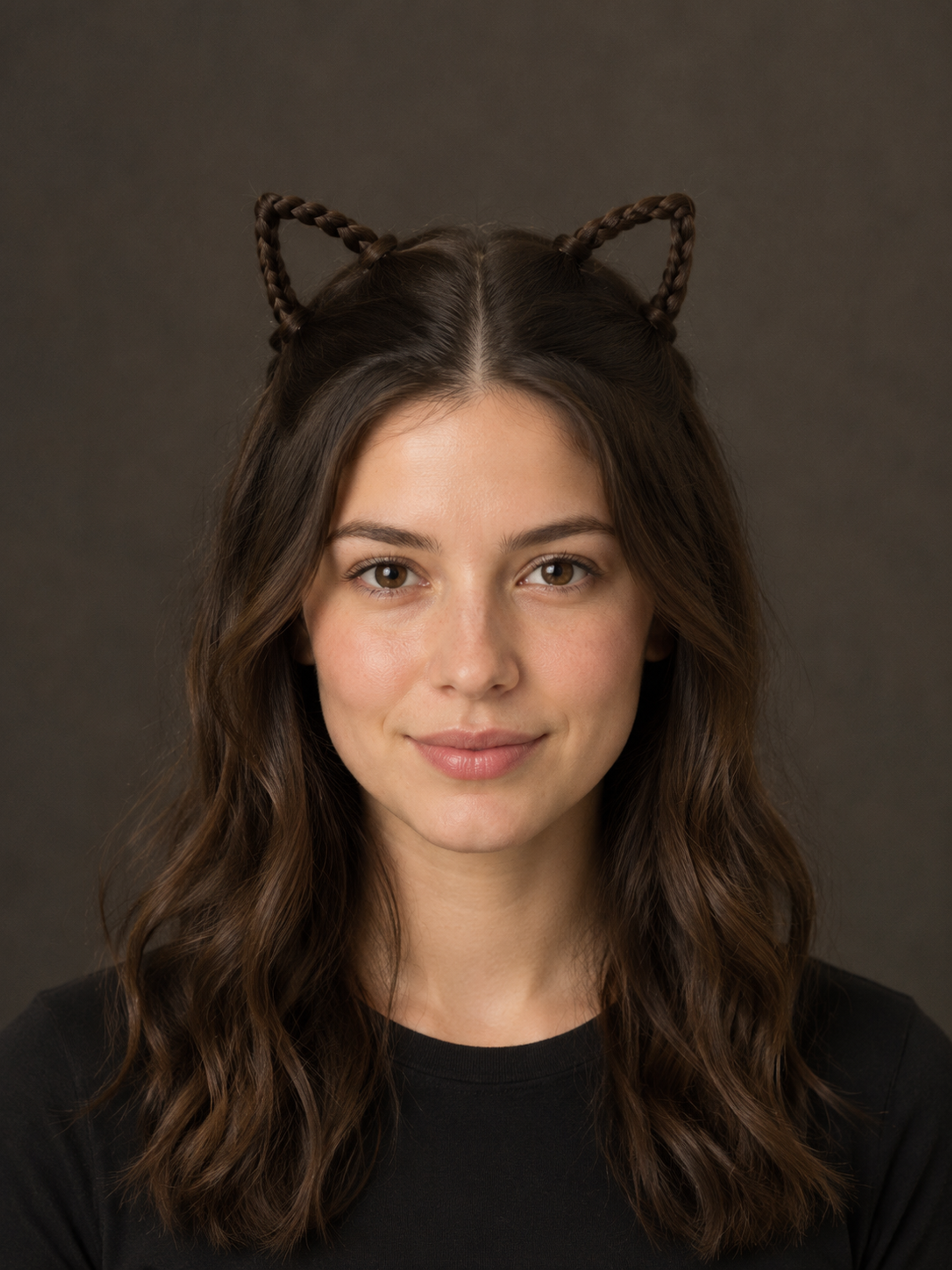
A Halloween look without a whole costume
Halloween hairstyles can be the part of a costume that makes ordinary clothes feel festive. A pair of braided cat ears works with a black shirt; small horn buns give a simple outfit a playful edge. Ghost buns take a softer direction with crinkled white tissue paper wrapped around two small hair buns.
This tool creates a photo reference for those three directions. The recipes ask to keep your face, hair color, clothing and setting while changing the hairstyle; details can still drift. The covers show original AI concepts, rather than guaranteed results or real before-and-after examples. Choose the shape you would like to see around your own face, then inspect the finished image before using it as inspiration.
Which hairstyle fits the look you have in mind?
Start with the silhouette. Cat ears use two triangular braided loops made from hair, with the rest worn down. They are a useful direction for a cat costume when you want the ears to feel part of the hairstyle. The preset does not add fur, animal ears or cat face paint.
Devil horns use compact twists that taper upward. They give more height than ordinary space buns, without adding a plastic headband. Ghost buns use small white tissue-paper coverings with simple dark eyes; the paper is an accessory, rather than white hair dye.
For Halloween hairstyles with short hair, think smaller: a half-up shape may be more practical than gathering every strand. The generated picture can invent length or volume, so it cannot confirm that your current hair will hold a style. Compare the options below, then check the source tutorials before planning the real version.
| Look | Main detail | Real-life planning |
|---|---|---|
| Cat ears | Braided triangular loops; loose lengths | Small braids, elastics and pins |
| Devil horns | Twisted, tapered half-up buns | Enough length for compact twists |
| Ghost buns | White tissue paper on two small buns | Light tissue paper and secure small ties |
Short hair, fine hair or curls: plan around your own hair
Easy Halloween hairstyles still depend on what you start with. Long hair leaves more length for braids and twists; shorter layers may need a smaller shape or a simple clip instead. With fine hair, a compact bun is often a more realistic starting point than a large sculpted one. Curly hair can keep its texture in a half-up look, although the model may change individual curls.
Leave space above your head in the source photo so the full hairstyle has room. Use even light and keep the hairline and both eyes visible. Avoid hats, heavy filters and photos where dark hair disappears into a dark background.
This is a visual experiment, not a measurement of hair length, a face-shape diagnosis or a promise of salon results. A stylist can help translate the shape into a version your own hair can support.
From a saved preview to a real party hairstyle
Use the result to choose a direction before collecting accessories. Cat ears generally involve small braided sections, elastics and pins; horn buns need twists held securely; ghost buns add light white tissue paper and small ties. The linked creator tutorials show practical construction. They are separate from the AI tool, which does not generate an instructional video.
For work or a low-key gathering, consider a modest shape that keeps hair out of your face. For a party photo, leave the whole hairstyle in frame and inspect it at a larger size. Look for impossible strands, floating decorations and changes to your face. A polished preview can hide awkward details in a thumbnail.
Want matching makeup? Use the separate black cat makeup tool after choosing your hair direction. That is another generation with its own cost; this page does not automatically apply both edits.
How to create your result
- 01
Choose a shape and upload a portrait
Select cat ears, devil horns or ghost buns. Sign in and upload one adult portrait in JPG, PNG or WebP, up to 10 MB and at least 256 pixels on each side. Keep the complete hairline visible and leave room above the head.
- 02
Set the crop and create a preview
Choose an image ratio and confirm the displayed 10-credit cost. A portrait crop gives the hair more room than a tight square. Follow the task status while processing. A different style or another attempt is a separate generation.
- 03
Check the details and save your reference
Compare the face, hairline and accessory edges with your original. Download a successful result you want to keep, then use it alongside a real tutorial or show it to a stylist. Check My creations before resubmitting an interrupted task.
Before you start: files, credits, and saved tasks
Privacy and image handlingYour photo is uploaded for processing through the service and its AI provider. Use an adult portrait you have permission to edit. This is an online photo tool; it does not run entirely on your phone or provide a live camera filter.
Browsing the looks does not start a paid task. Generation requires sign-in and costs 10 credits per image. Failed or delayed tasks should be checked against their displayed status and refund information before you try again.
Questions before you generate
Are these easy Halloween hairstyles I can actually make?
The shapes are inspired by practical braids, twists and buns, but the AI image is a concept. It may invent volume, length or attachments. Use the linked tutorials for construction, and adapt the size to your own hair instead of copying every generated detail.
Can I try Halloween hairstyles with short or curly hair?
You can upload a clear adult portrait with short or curly hair. The model may alter length or texture, so this is not a physical suitability test. Smaller half-up shapes or simple accessories can be more practical when your hair will not reach a full bun.
Will the preview also change my makeup and clothes?
The presets request hairstyle changes while retaining your face, existing makeup, clothes and background. Those areas are not locked at the pixel level. Cat ears and horns are formed from hair; no fur, animal anatomy or costume change is requested.
Can I use this for a child’s school Halloween hairstyle?
The photo tool is designed around one adult portrait. For children’s Halloween hairstyles, browse a creator’s age-appropriate tutorial with a parent instead. This page does not offer a children’s photo mode or assess whether accessories meet a school’s rules.
Is the hairstyle preview free, and can I download it?
Browsing is free. Creating an image costs 10 credits and requires an account. Successful tasks provide a download control and appear in My creations. This is a still photo preview, rather than a live filter or a bundle of unlimited attempts.
Find the right Halloween tool
Choose a task first, then a style. Every tool below uses the same account and credit balance.