
Black Cat Makeup Photo Try-On
Preview black cat makeup on your own portrait: winged eyeliner, a small painted nose and fine cheek whiskers. This template edits facial cosmetics, with instructions to keep your hair, clothing, pose and background. It creates a human-face Halloween makeup concept, without fur, leopard spots, cat ears or an animal muzzle.
Original concept covers, not guaranteed outputs. Each template has its own photo requirements.
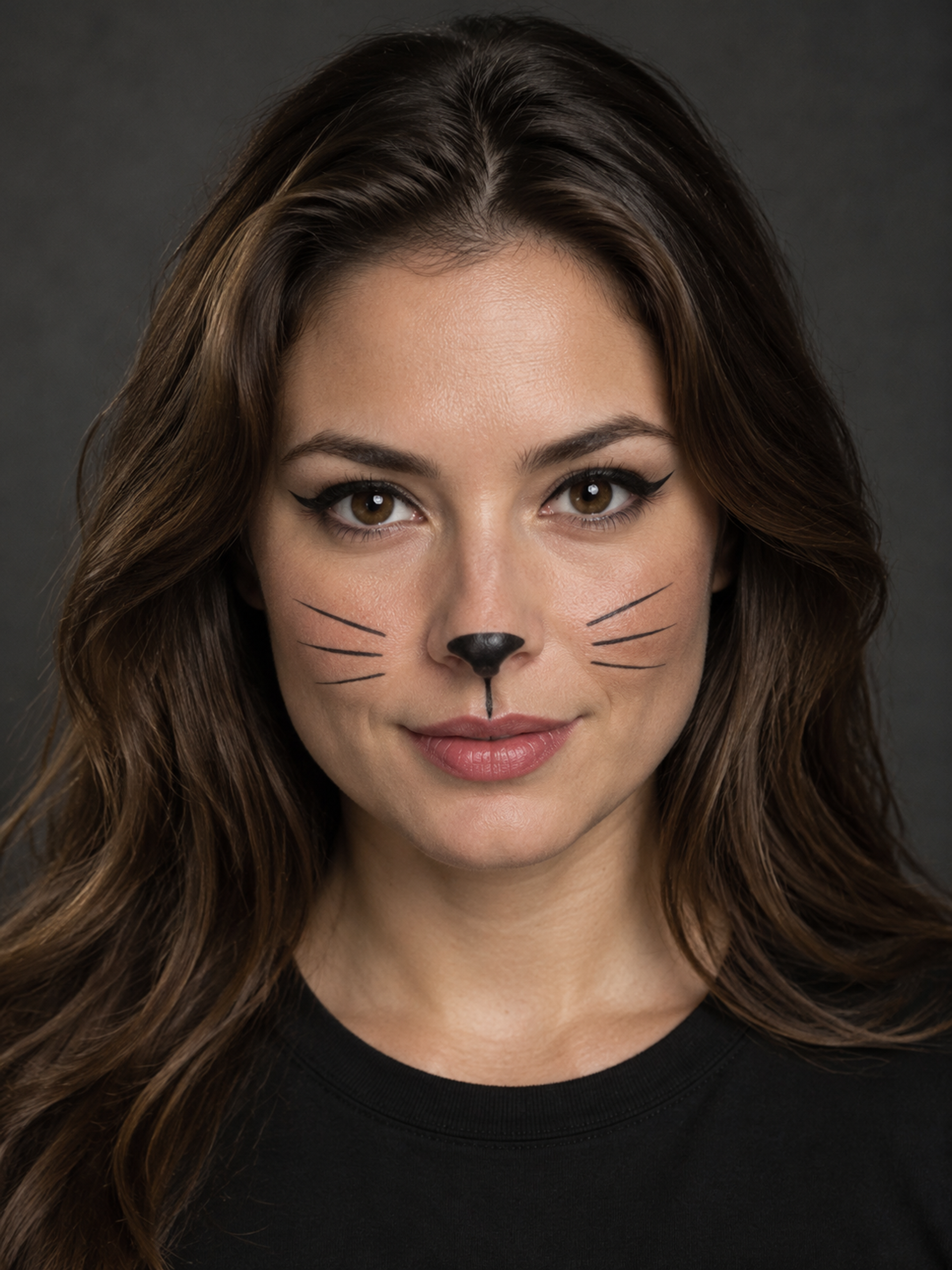
A simple cat look built around your own face
Black cat makeup works through a few clear cosmetic details rather than a complete animal transformation. The template combines extended dark eyeliner, a small black nose tip and fine painted whiskers on each cheek. A short line above the upper lip connects the look while leaving the mouth human. The unpainted parts of the face should retain natural skin tone and texture, with eyes open and recognizable.
Use the preview to decide whether this direction suits a Halloween selfie, an understated party look or a makeup mood board. You do not need a costume, a cat-ear headband or theatrical prosthetics in the source photo. The example illustration shows the intended pattern, not an actual customer transformation. Because the output is generated, inspect your features and the makeup edges before keeping it. The recipe aims to preserve the reference, but cannot promise that every original pixel or facial detail stays unchanged.
Black cat face paint is different from a cat-eye filter
A cat eye can mean eyeliner alone, while black cat face paint usually also includes a painted nose and whiskers. This preset gives you the fuller Halloween combination. It is also distinct from cheetah makeup, which uses warm tones and spots, and from an animal-face effect that replaces human features with fur or a muzzle. Knowing the difference helps you choose an image that answers the look you actually want.
For easy black cat makeup, pay attention to the balance between the liner and the whiskers. In a small profile picture, a few clean marks may be more legible than dense decoration. This template has a fixed design, so there are no separate sliders for line thickness, whisker placement or eye shape. If you need exact control over individual strokes, use the output as a reference for manual makeup or a separate image editor rather than expecting a brush tool here.
| Look | Defining marks | This template |
|---|---|---|
| Black cat makeup | Winged liner, black nose, fine whiskers | Yes: human face and surface cosmetics |
| Cat-eye eyeliner | Eye makeup without nose or whiskers | Not a separate setting |
| Cheetah makeup | Warm tones and spotted markings | Use the makeup collection |
| Animal transformation | Fur, muzzle or changed anatomy | Not supported here |
Choose a reference that shows the eyes and cheeks
A clear front-facing portrait or a slight three-quarter angle gives the makeup room to read. Keep both eyes open, with the cheeks and nose visible. Even lighting makes it easier to assess whether a thin whisker line is intentional or a generation artifact. Remove sunglasses, avoid hair across the face and choose a source without an existing heavy costume filter. The photo can show your ordinary clothes and usual background.
The black cat makeup recipe asks to preserve those clothes, the hairstyle, framing, lighting and environment while editing the facial cosmetics. That is the intended editing scope, not a guarantee of exact background preservation. If your source is blurry or strongly filtered, details may drift. After generation, compare the eyes, nose shape and mouth with the reference as well as checking the painted marks. Try a clearer source when identity is hard to recognize.
Use a digital preview before planning real makeup
For a Halloween selfie, inspect the picture at a normal viewing size and zoom in on the liner and cheek lines. For a mood board, save the overall arrangement you like and discuss how to recreate it with products intended for cosmetic use. A black cat makeup image can show a style direction; it cannot tell you which eyeliner will last all night, which ingredients suit your skin or how a product will behave around your eyes.
If you decide to apply the look in real life, follow each cosmetic product's instructions and keep ordinary craft markers away from the face. The generator is not a medical or product-safety assessment. For an invitation or social post, add lettering afterward in an editor rather than expecting accurate text in the generated portrait. Review the nose paint, whisker symmetry, eyes and unchanged areas before downloading. The result is a still image, with no automatic costume change, physical makeup kit or video included.
How to create your result
- 01
Choose a clean portrait
Sign in, select the black cat template and upload one JPG, PNG or WebP. Keep the eyes, cheeks and nose visible. Check the source preview before generating.
- 02
Select the framing and submit
Choose the ratio for your portrait or post. Review the 10-credit photo cost, then submit once. The tool displays processing while the service creates the image; completion time varies.
- 03
Inspect the makeup details
Check the liner, nose paint and whiskers, then compare your likeness and the surrounding scene with the reference. Download a successful result. If a connection is interrupted, check the task in your creations history before submitting again.
Before you start: files, credits, and saved tasks
Privacy and image handlingUse one photograph you have permission to upload. JPG, PNG and WebP files are supported, up to 10 MB each, with width and height both at least 256 pixels. One clear person is the intended subject; this is not a pet editor.
An account and sufficient credits are required. Photos are uploaded for processing, so the editor is not offline or entirely on-device. Read the privacy policy before submitting personal images and avoid sensitive material.
Questions before you generate
Will black cat makeup add ears or change my outfit?
The preset edits facial cosmetics only and asks to preserve your clothing, hair, pose and setting. It does not request cat ears, fur or a new costume. Generated results may still alter details, so compare them with the original before using the image.
Is this suitable for a simple Halloween makeup idea?
Yes, if you want a digital preview of winged liner, a black nose tip and whiskers. It is a style reference, not a step-by-step physical makeup lesson or a guarantee of how specific products will look or wear on your skin.
Can I keep the eyeliner but remove the whiskers?
Not through an individual control on this page. The black cat makeup recipe is fixed. For precise changes to one line or feature, use a separate editor or treat the image as inspiration when applying your own makeup.
Does it work on a photograph of my black cat?
This page is designed for human facial makeup, not animal portraits. Use the pet Halloween page for supported pet costumes. Uploading a cat here would not match the intended subject or the facial-cosmetic instructions.
Is generating the preview free?
Browsing the templates is available before generation. Creating a photo requires sign-in and the displayed 10 credits per task. Check your balance and available plans before submitting; this page does not promise unlimited free generations.
Find the right Halloween tool
Choose a task first, then a style. Every tool below uses the same account and credit balance.