
Werewolf Costume Photo Generator
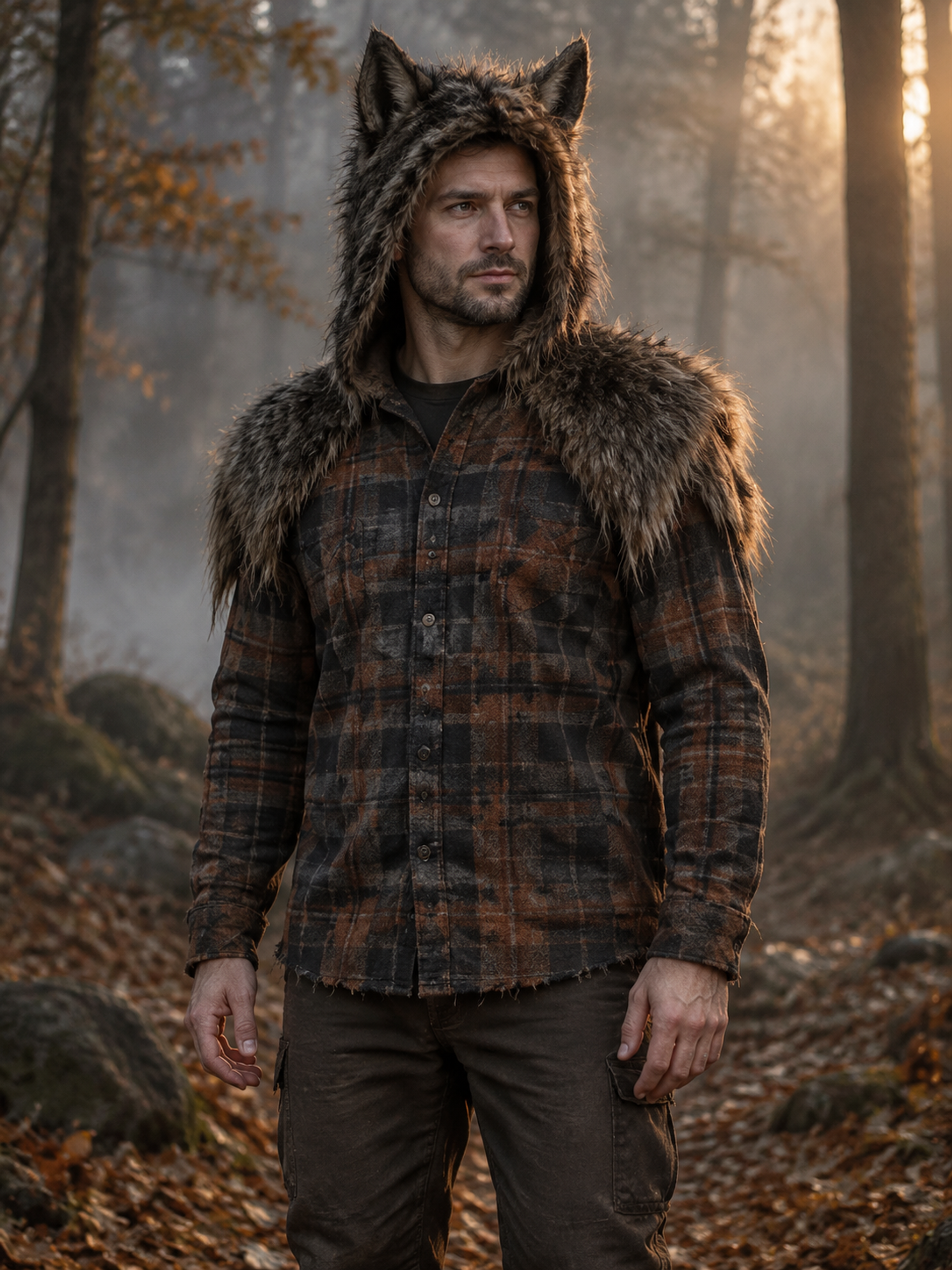
See yourself in a werewolf costume with a pointed-ear fur hood, textured shoulders and weathered plaid. Upload one portrait for a human-faced Halloween outfit in an autumn woodland scene. This preset changes clothing and scenery; it is designed as costume photography, rather than an animal-head transformation.
Original concept covers, not guaranteed outputs. Each template has its own photo requirements.
A werewolf outfit that leaves your face visible
The key to this werewolf costume is a readable human face framed by convincing costume materials. A furry hood supplies the pointed ears, while faux-fur shoulders and a weathered plaid layer establish the silhouette. The scene is an autumn woodland with restrained warm light. The intended result is someone wearing a wolf-inspired outfit, with stitched fabric and realistic proportions, rather than a person turning into an entirely different creature.
That distinction matters if you want a Halloween avatar in which friends can still recognize you. It also helps when you want inspiration for a wearable costume instead of a fantasy creature illustration. The recipe asks to retain facial identity, but AI generation can change details, and a visible face is not a guarantee of exact likeness. The page cover is a concept illustration showing the intended costume direction, not a customer result or a measured before-and-after example.
Choose costume photography or a creature transformation
A werewolf generator can mean several different things: a dressed human, a face with prosthetic-looking features, or a complete wolf-headed creature. This page supports the first option. It does not offer a transformation-strength slider, an animal muzzle or a full wolf mask. If your goal is a creature design for a game or a scene showing a physical transformation, this fixed portrait template is not the right tool for that task.
For a DIY werewolf costume, look at how the ear shape, fur shoulders and plaid layers work together. Those are useful visual cues, but the generated materials do not prove that a real hood will fit, feel cool enough or allow clear hearing. Plan those details separately. You can use the picture to discuss a simple werewolf outfit with a friend or costume maker without treating every AI-created seam as something that can be sewn exactly.
| Approach | Face | Available here |
|---|---|---|
| Wearable werewolf costume | Human face inside a fur hood | Yes: preset outfit and scene |
| Wolf mask or muzzle | Partly or fully covered | No mask selection |
| Full creature transformation | Animal head or body | Not this preset's purpose |
Give the hood room around a clear portrait
Start with one person in a well-lit photo, with both eyes and the face unobstructed. Leave some space above the hair and around the shoulders so the model has a clear starting point for the hood and costume layers. A chest-up or wider reference is often easier to assess than a tightly cropped face. You do not need an existing furry outfit, woodland background or theatrical makeup.
Avoid a source with a hand across the mouth, a heavy mask, strong beauty filters or several people. These make it harder to see whether the resulting werewolf costume still belongs to the intended person. Similar advice applies to low-light party photos: a dark atmosphere may suit the final image, but a clearer reference helps the model read the face first. The preset creates its own setting, so choose the reference for identity and pose rather than background decoration.
Use the portrait as a practical starting point
For a profile picture, inspect the result at the size people will actually see. The hood should read as pointed ears without swallowing the face. For a party invitation, select a ratio that works with your layout and add the event text afterward in an editor. For costume planning, compare the outline of the shoulders and the contrast between fur and plaid, then decide which elements you can comfortably recreate.
Before downloading, check facial likeness, the hood opening, hands and clothing edges. Human hands should remain anatomically plausible, and the picture should not grow a muzzle or extra ears. AI output can miss the intended direction; choose a clearer source if the face or costume is wrong. This werewolf costume task creates a still image. Animation, custom creature design, exact garment fitting and manual edits to individual costume parts are separate needs that this preset does not provide.
How to create your result
- 01
Upload one clear reference
Sign in and select the werewolf template. Add a JPG, PNG or WebP with a visible face and space around the head and shoulders. Check the preview before submitting.
- 02
Choose the image framing
Pick a supported ratio for an avatar, portrait or invitation. Review the 10-credit photo task cost. Submit once and keep the processing state open while the service works.
- 03
Check the human face and costume
Review the eyes, expression, hood, fur edges and hands. Download the successful result when you are happy with it. If the connection drops, check the existing task in your creations history before starting another.
Before you start: files, credits, and saved tasks
Privacy and image handlingThis template needs one reference image you have permission to use. Supported inputs are JPG, PNG and WebP, up to 10 MB, with width and height each at least 256 pixels. A crowded photograph is less suitable than a clear solo portrait.
You need an account and enough credits to generate. Images are uploaded for processing rather than edited offline. Consult the privacy policy before submitting personal photos, and do not upload sensitive material.
Questions before you generate
Will this turn my face into a wolf head?
The intended result keeps a human face within a furry pointed-ear hood. It adds a werewolf costume and a woodland scene rather than replacing the head with an animal. Results can vary, so reject an output that fails to preserve the intended human-faced look.
Do I need to wear plaid or fur in the original?
No. The template generates the clothing layers from your reference. Choose your photograph for a clear face and readable pose. Your original clothing and background are not expected to stay unchanged in this costume portrait.
Can I make a simple werewolf costume reference?
Yes, as visual inspiration. The hood, ears, fur shoulders and plaid give you elements to discuss or recreate. The image cannot check the fit, price, availability or comfort of real materials, and it does not supply an exact sewing pattern.
Can I adjust the amount of fur or add claws?
This is a fixed template with supported framing ratios, not a free-text costume editor. It does not expose individual controls for fur length, claws, eye color or the level of transformation. Review the cover and description before deciding whether it suits your goal.
Does it support two people or a pet wolf costume?
This werewolf costume preset takes one person's reference. It is not a pet outfit editor or a two-person scene. Use the pet Halloween or couple costume pages for their supported subjects and templates instead of submitting those inputs here.
Find the right Halloween tool
Choose a task first, then a style. Every tool below uses the same account and credit balance.