
Corpse Bride Costume Photo Generator
Try a corpse bride costume in a photo before you plan the dress and makeup. Upload one clear portrait to create an original blue-gray bridal look with distressed ivory lace, a veil and a moody autumn setting. This is an AI costume portrait, with intentional changes to clothing, makeup and scenery.
Original concept covers, not guaranteed outputs. Each template has its own photo requirements.
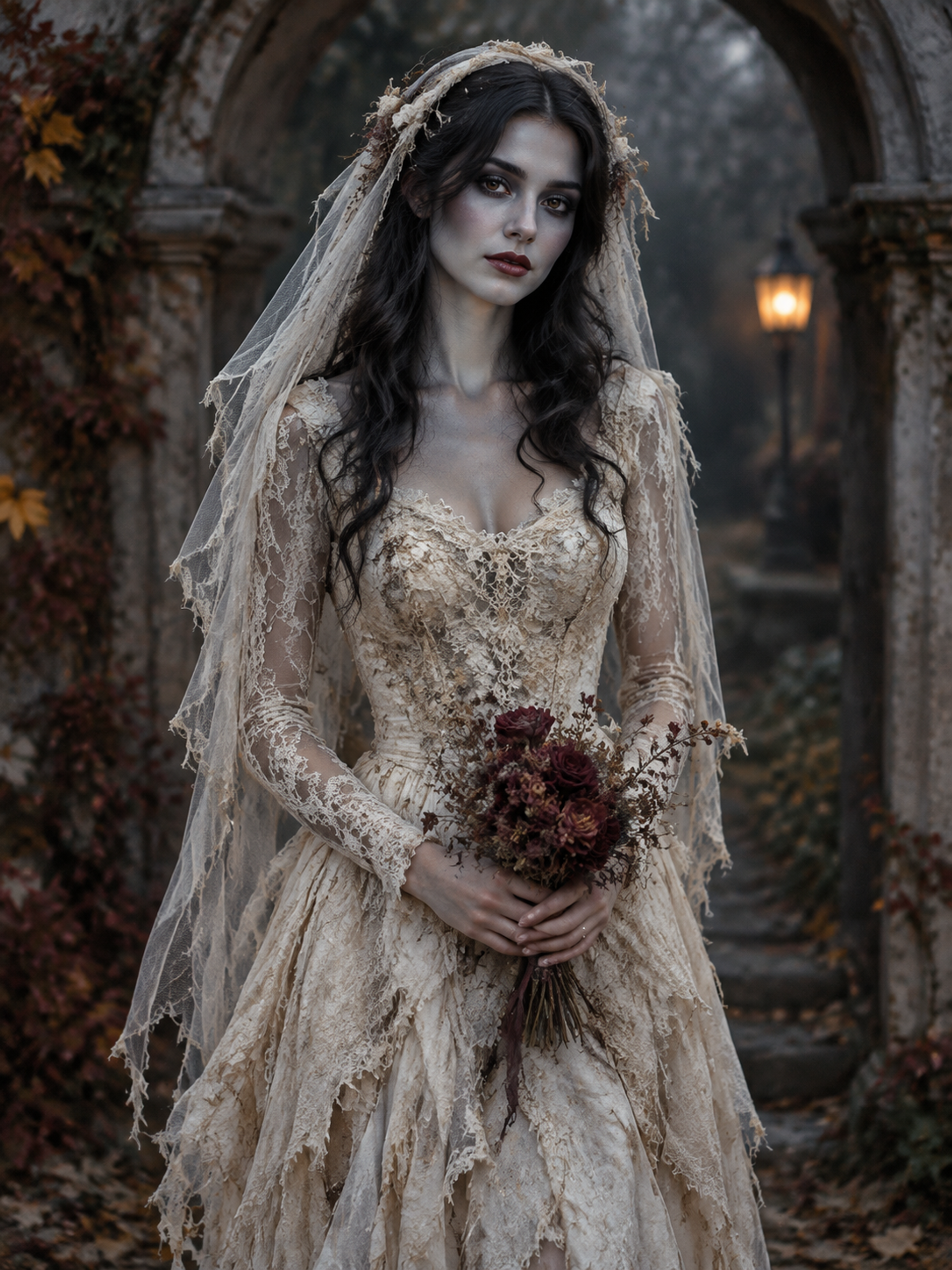
A bridal look with an unmistakably eerie finish
A corpse bride costume needs more than a white dress in a dark room. The recognizable combination is cool theatrical makeup, weathered bridal fabric and a veil that still lets you see the face. This template brings those elements into one portrait, with dried roses and muted light completing the scene. Blue-gray color is treated as cosmetic paint over a human face, rather than exposed anatomy or a skull replacement.
Use the result as a visual starting point for a Halloween profile picture, an invitation or a costume mood board. The reference guides facial identity, but generation can alter details, so compare the eyes, expression and face shape before choosing an image. The illustration on this page is an AI concept showing the intended direction. It is not a photograph of a customer or a guarantee that your output will match every fold of the dress.
Corpse bride, gothic bride or a makeup-only edit?
Choose the effect by what you want changed. This corpse bride costume template creates a complete bridal scene: makeup, dress, veil and surroundings. The separate gothic portraits page offers a bridal look with natural skin tone. If you want to keep your own outfit and background, the Halloween makeup collection is the more focused starting point. These are different editing tasks, even when all three feel dark and romantic.
For a DIY corpse bride costume, a generated image can help you judge the balance between pale fabric and cool makeup. It cannot identify a dress size, supply a shopping list of exact products or predict how paint will behave on your skin. Notice which elements you like, then make practical choices separately. A comfortable veil, wearable shoes and cosmetics intended for the face matter more at a real party than a dramatic detail that only works in an image.
| Look | Main change | Face treatment |
|---|---|---|
| Corpse bride costume | Bridal outfit and a new scene | Blue-gray theatrical paint |
| Gothic bridal portrait | Antique lace and moonlit scenery | Natural skin tone |
| Makeup collection | Cosmetic details on your reference | Outfit and background intended to stay |
Start with a face the camera can actually see
Pick a solo photograph with even light and a visible face. A front view or a gentle three-quarter angle gives the model clearer information than a steep selfie angle. Remove sunglasses and avoid hair crossing both eyes. An upper-body reference is useful when you want the dress and bouquet to have space; a tight crop leaves less information about shoulders and pose. You do not need to wear a wedding gown in the source.
The template is designed to preserve recognizable facial features while adding blue-gray surface makeup. That aim does not make identity preservation exact. Heavy beauty filters, a tiny face in a distant shot or existing elaborate face paint can make the result harder to judge. If a portrait feels unlike you, try a clearer reference rather than repeatedly submitting the same difficult image. Keep the face readable beneath the makeup when reviewing your corpse bride costume preview.
Make the image useful for your Halloween plans
For an avatar, check the face at a small size: the veil should frame it, and the eye makeup should not turn the eyes into unreadable dark patches. For an invitation, choose an aspect ratio that leaves room in your own layout for the event details. The generator produces the portrait; add dates, names and other lettering afterward in your preferred editor so important information stays accurate.
For a costume reference, save the details you would actually recreate: the cool makeup palette, distressed lace, soft veil or dried bouquet. This is an original corpse bride costume interpretation rather than a licensed film replica. It does not reproduce a named character's exact face or costume. Review hands, fabric edges and facial likeness before downloading. If you later want motion, treat animation as a separate task with its own supported templates and credit cost, rather than assuming this photo tool creates a video.
How to create your result
- 01
Choose a clear solo portrait
Sign in, select the bridal template and upload one JPG, PNG or WebP. Use a photo with a visible face and enough space around the shoulders. Review the input preview before continuing.
- 02
Set the framing and generate
Choose the image ratio for your intended use. The displayed photo task costs 10 credits. Submit once and let the processing state finish; generation time varies with the service.
- 03
Review before you download
Compare facial likeness, the painted skin boundary, hands and veil edges. Download a successful image from the result area. Your creations history is the place to check an existing task if a connection interrupts the page.
Before you start: files, credits, and saved tasks
Privacy and image handlingUpload only a photo you are entitled to use, with the subject's permission where needed. Each file must be JPG, PNG or WebP, no larger than 10 MB, and at least 256 pixels on both sides. This template takes one reference.
Sign-in and sufficient credits are required to generate. Photos are uploaded for processing; this is not an offline editor. Read the privacy policy before submitting a portrait, and avoid uploading sensitive images.
Questions before you generate
Can I create a corpse bride costume without owning a dress?
Yes. The template adds the bridal clothing, veil and scene to your reference photograph. It produces an image, not a physical costume. Use the portrait for inspiration, then decide independently what clothing and accessories you want to buy or make.
Will the blue makeup change my face completely?
The recipe asks for blue-gray surface cosmetics while retaining human proportions and recognizable identity. AI output can still vary. Check the eye shape, mouth and expression; there is no promise of a pixel-perfect likeness or a manual intensity slider.
Is this the same as the gothic bride template?
No. The corpse bride costume uses visibly blue-gray makeup and a distressed gown. The gothic bridal portrait keeps natural skin tone and uses antique ivory lace. Choose the latter if you want the dark romantic setting without the corpse-inspired paint.
Can I upload two people or make a bride-and-groom photo?
This template accepts one person's reference. It does not provide a two-person bridal scene. For a shared Halloween portrait, use the couple costume page and choose one of its supported pairs; those pairs have their own clothing and face coverage.
Can I change the prompt or choose exact dress details?
The page uses a preset recipe rather than a free-text prompt field. You can choose the supported framing ratio, but cannot request exact lace patterns, a specific dress brand or a precise licensed character through this template.
Find the right Halloween tool
Choose a task first, then a style. Every tool below uses the same account and credit balance.