
Gothic Halloween Portraits From Your Photo
Build a Halloween character around your own portrait: lace-clad bride, velvet vampire, handmade fairytale doll or Victorian ghost. These four gothic Halloween portraits reimagine the wardrobe, lighting and location together. Browse the concept artwork, then pick a scene for your photo. Image generation requires an account and 10 credits per result.

Original concept covers, not guaranteed outputs. Each template has its own photo requirements.
A gothic portrait, with you as the starting point
Gothic Halloween portraits combine dramatic clothes, atmospheric light and a recognisable face. This AI photo generator uses one uploaded portrait as its reference and applies the selected scene instructions. It is useful when you want a Halloween profile picture or costume concept without organising a studio, finding a location or sourcing a complete outfit.
These four templates change clothing and surroundings as well as the mood of the picture. The instructions ask the model to preserve your facial identity and natural skin tone. They do not lock facial details or the original background. Expect some variation, especially around fine jewellery, hair, fingers and fabric edges.
The gallery images are AI concept illustrations showing each direction. They are not before-and-after evidence for your photo. Your source image and output ratio will influence the result. Choose a scene you like, then review the generated portrait at a larger size before deciding to share it.
Which of the four gothic looks fits your idea?
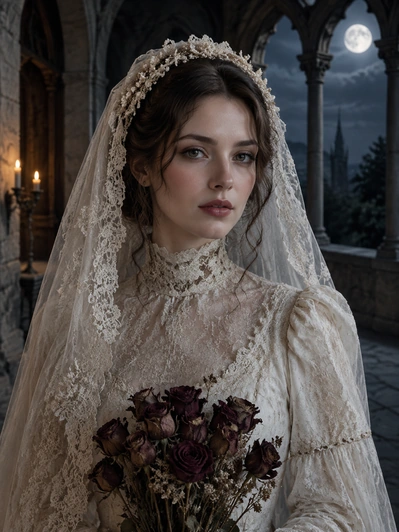
Choose gothic bride for lace, a visible face and a moonlit stone setting. It suits a romantic ghost bride photo without a veil covering the eyes. The template creates an original character, rather than reproducing a named movie costume or an actor’s likeness.
Candlelit vampire uses velvet clothing and warm candlelight against a dark interior. It requests subtle fangs without blood. Pick it for a formal, theatrical portrait. If you only want burgundy eye makeup while keeping your own clothes, use the dedicated Halloween makeup page instead.
Dark fairytale doll takes a different direction: handmade textures and stop-motion character proportions, with open human eyes. It intentionally looks less photographic. Moonlit Victorian ghost keeps the face visible and uses period clothing and cool moonlight. It does not hide you under a sheet. Compare the changes below before spending credits.
| Look | Visual direction | What changes |
|---|---|---|
| Gothic bride | Lace and a moonlit stone cloister | Bridal outfit, scene and lighting |
| Candlelit vampire | Velvet, warm candlelight and subtle fangs | Costume, scene and facial accents |
| Dark fairytale doll | Handmade textures and open human eyes | Character style, clothes and setting |
| Moonlit Victorian ghost | Period dress and a clearly visible face | Outfit, cool light and surroundings |
Give the costume room without losing the face
Think of the reference as a casting portrait. The scene will supply the wardrobe, so facial detail matters more than wearing a convincing costume beforehand. Choose a photograph of one adult with an unobstructed expression. A simple top is enough; elaborate accessories in the original can compete with the collar, lace or velvet requested by the scene.
A shoulder-length composition provides useful room for those costume details. Keep the jaw and some space above the head inside the frame. If the source is a distant holiday snapshot, the face may be too small to anchor a recognisable character. Deep backlighting can also obscure the features you most want to retain.
Decide where this gothic portrait will appear. The studio begins at 4:5, a practical vertical shape for an individual character. Other ratios can redistribute the setting around the subject. An avatar needs a readable expression within a circular crop; an invitation image may benefit from more visible scenery. Neither the reference nor the ratio fixes the final placement of every detail.
Make the portrait useful beyond the thumbnail
Open the finished image and check the eyes, teeth, skin tone, hairline and any visible hands. Inspect lace and clothing edges for invented details. A dark scene should still have a readable face: dramatic lighting is less useful if friends cannot recognise you in a small avatar.
Download a result you want to keep before starting another generation. Use it as a seasonal profile picture, a personal party invitation image or a costume mood reference. Add event details in your usual design tool after downloading. This generator does not promise accurate lettering, print-ready layouts or physical costume instructions.
For a makeup appointment, use the separate face-paint templates to keep attention on the painted areas. For motion, start with an image you like and explore the related video tools; generating a still portrait does not animate it. These four gothic looks are designed around a single person, so choose another tool for a couple or pet.
How to create your result
- 01
Cast yourself in one of the four scenes
Open the bride, vampire, doll or ghost template to load its scene into the studio. After signing in, supply your portrait and check that the selected name matches the atmosphere you want. The concept cover is a style guide, so base your choice on the costume and setting rather than expecting its model or composition to be reproduced.
- 02
Compose the character and start the task
Set the frame shape for your intended use, then submit when your balance covers the 10-credit image cost. Only the generation action starts this task. Watch its progress before requesting another scene. Purchasing more credits can bring you back to this portrait page with the same template selected.
- 03
Keep the character that works at full size
Once processing finishes successfully, enlarge the portrait and examine the character as a whole: face, costume and scene. Download a keeper before moving to a different variation. If the browser loses contact mid-task, look for that submission in My Creations; the remote generation may still be running.
Before you start: files, credits, and saved tasks
Privacy and image handlingReference file: one adult subject, saved as JPG, PNG or WebP. Maximum file size is 10 MB; width and height must each reach 256 pixels. For lace collars and period dress, favour a clear head-and-shoulders composition over a close facial crop.
Budget for the scene you select: 10 credits buys one generated image. Opening artwork is only browsing. Track a submitted scene in the studio or My Creations, where the task’s processing, failure or refund state determines what to do next.
Permission and processing: submit a portrait you are entitled to edit. This service sends the upload for AI processing; it is not an offline editor. The privacy policy explains data handling. Costume transformations may also alter facial details, so check the finished likeness.
Questions before you generate
Can I create gothic Halloween portraits for free?
The gallery is available to explore before you commit to a character. To generate your own gothic portrait, sign in and spend 10 credits for that image. Comparing all four looks through generation would therefore cost 40 credits, before any additional attempts. A connection problem alone is not a reason to pay for a replacement task; check the existing submission first.
Will the portrait still look like me?
The recipes ask for your facial identity and natural skin tone to remain recognisable. Generative editing can change details, and the fairytale doll look deliberately stylises the face. A clear, unobstructed source helps. Compare the result with your original; exact likeness, identical expressions and unchanged facial proportions are not guaranteed.
Does this also change my outfit and background?
Yes. All four gothic scenes are costume-and-setting transformations. They can replace your clothes, surroundings and lighting. For a photo preview focused on face paint, choose the Halloween makeup tool instead. These are still-image effects, not a live camera filter, a group-photo editor or an automatic video generator.
Can I make a gothic portrait from a phone photo?
Yes, provided the phone photo meets the file requirements below and clearly shows a single adult. Open the studio in your mobile browser to select it. Stay online while uploading and checking progress. Generation runs remotely with an AI provider, so consult the privacy policy when deciding which personal portrait to submit.
Find the right Halloween tool
Choose a task first, then a style. Every tool below uses the same account and credit balance.