
Fairy Halloween Costume: See Your Own Look
Try a fairy Halloween costume built around your own photo. Choose a flower-trimmed garden look or a black-and-plum dark fairy, with translucent wings, a coordinated outfit and makeup. Upload one clear solo photo to create a digital portrait. Sign-in and 10 credits per image are required; clothing and scenery will change.
Original concept covers, not guaranteed outputs. Each template has its own photo requirements.
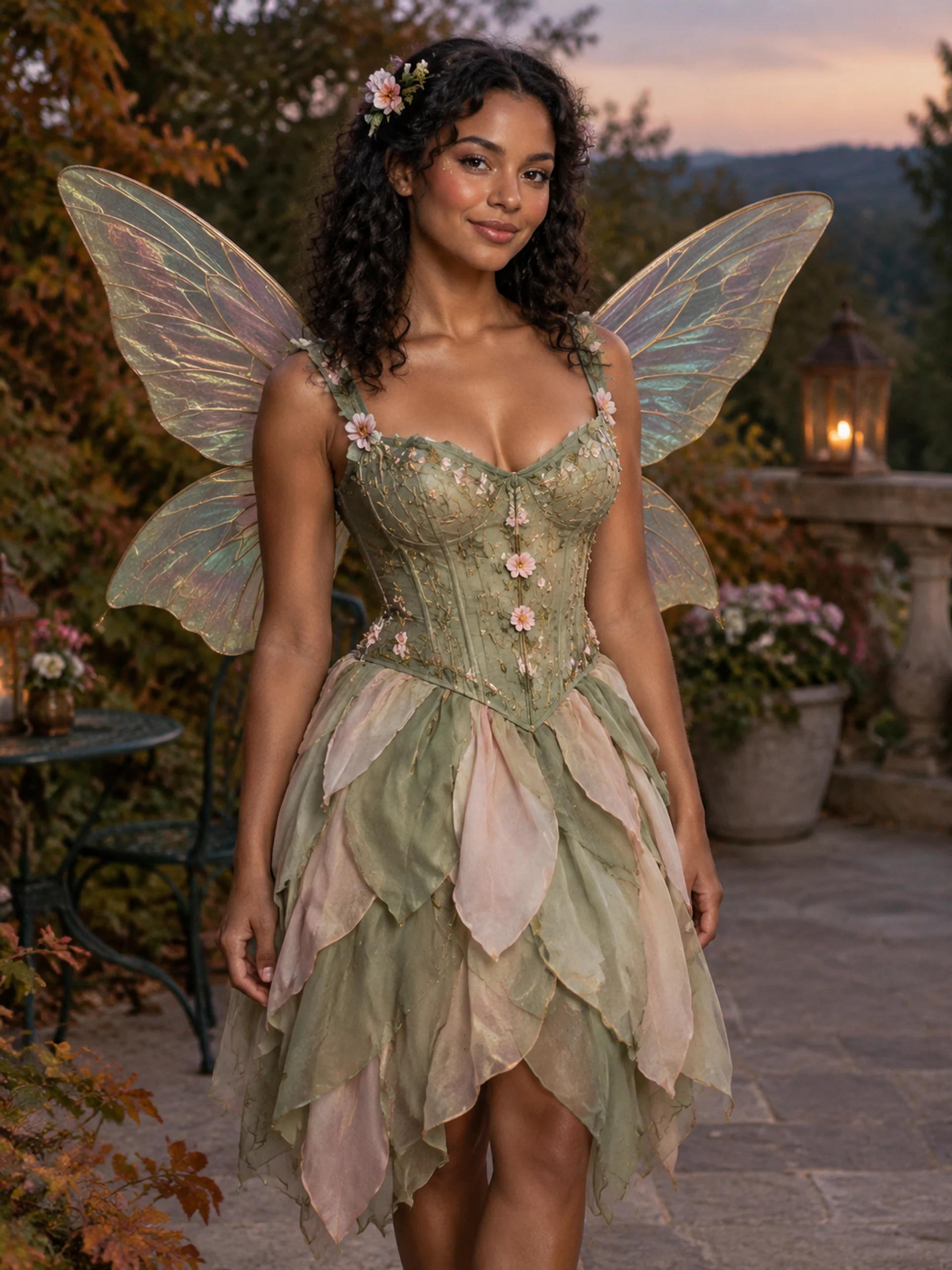
A fairy look you can picture yourself wearing
A fairy Halloween costume usually comes together through three visible choices: wings, clothing and a shared colour palette. A petal skirt with a flower-trimmed bodice feels playful; black lace and smoky wings feel more theatrical. This photo tool gives you a starting point for comparing those directions on yourself, without needing a finished costume in the source picture.
The two templates create original adult costume portraits. Garden Fairy pairs sage fabric, blush flowers and delicate veined wings in a softly lit terrace setting. Dark Fairy uses plum and charcoal layers, black lace and darker wings against a stone courtyard. Both request a visible human face and wearable fabrics. The gallery images are AI concept illustrations showing the intended looks, rather than customer photographs or guaranteed results.
Garden fairy or dark fairy?
Choose Garden Fairy when you want a softer fairycore outfit: pale green, pink flower details and translucent organza-style wings. The framing aims to show the bodice, skirt and wing outlines together. This is useful for a flower fairy costume mood board or a seasonal profile picture that feels light rather than frightening.
Choose Dark Fairy when you prefer a gothic Halloween outfit with stronger contrast. Plum makeup, black lace sleeves and a layered dark skirt make the character readable without a mask. It remains a person wearing a fairy costume; the recipe does not request horns, fangs or an animal transformation. Compare the actual result before deciding which colours and details you would recreate.
Each template supplies one defined look. The page has no separate wing-size, dress-colour or makeup sliders, and it does not reproduce a named film character. The comparison below explains the choices available here.
| Look | Outfit and wings | Best starting point |
|---|---|---|
| Garden Fairy | Sage bodice, blush flowers, translucent wings | Soft flower-fairy portrait |
| Dark Fairy | Plum layers, black lace, smoky wings | Gothic costume portrait |
| Makeup only | Keep your clothes and setting | Use the makeup collection |
Prepare a photo that leaves room for wings
Use one recent photograph of one adult, with the eyes, hairline and face clearly visible. A half-body or wider picture with space around the shoulders gives a more useful starting point than a tightly cropped selfie. Keep hands away from the face. Even lighting and an uncluttered source make it easier to judge whether the generated fairy portrait still resembles you.
You can start in everyday clothes. The generator requests a new outfit and location, so your original room or garden does not need to match the chosen scene. A source containing several people, heavy filters, a large hat or existing wings may make the intended subject harder to interpret. The tool asks to retain facial identity, age and skin tone, but generative editing can change features, pose and proportions.
After generation, inspect the face first, then the shoulders, hands and wings. Check that the wings sit behind the body, that both outlines make sense and that clothing is complete. Reject a result with extra arms, merged fingers or fabric that blends into the background.
From a costume idea to a shareable portrait
Save a result as a digital Halloween portrait, a profile image or a reference for planning your own outfit. For a last-minute fairy Halloween costume, use the picture to choose a colour family and identify the few details that communicate the look. A dress, wings and a flower accessory can provide a direction; the image cannot tell you whether real items fit, arrive on time or feel comfortable at a party.
If you want matching fairy costumes with friends, agree on a shared palette and generate individual portraits separately. This page accepts one person per task and does not combine friends into a group photograph. For a real event, consider how wings move through doorways and whether you can sit down comfortably. A beautiful digital silhouette is only a visual reference.
The result here is a still image. Add invitation wording or captions in a separate editor so you can check spelling and event details. Download a result you like before trying another variation. If you already have a finished outfit and want movement, explore the separate Halloween video tools and read their input requirements.
How to create your result
- 01
Pick the mood
Compare both concept images, then choose Garden Fairy or Dark Fairy in the studio. The selected thumbnail sets the outfit, wing style and background together. You can browse before signing in.
- 02
Upload and create
Sign in and upload one supported photo. Choose an aspect ratio, review the displayed 10-credit cost and submit once. Keep the task open while it processes; generation time varies.
- 03
Review and download
Inspect your face, the clothing and wing attachments at full size. Download a successful portrait. If the connection drops, check your creations history before starting another task to avoid unnecessary repeats.
Before you start: files, credits, and saved tasks
Privacy and image handlingUpload one JPG, PNG or WebP image, up to 10 MB, with both dimensions at least 256 pixels. Use a clear solo adult photo you have permission to upload. An account and sufficient credits are needed to generate.
Your reference is uploaded for AI processing; this is an online service. Read the privacy policy before submitting personal photos, and avoid sensitive documents or unrelated people in the background. The illustration previews do not establish exact facial likeness.
Questions before you generate
Can I try a fairy Halloween costume without buying one?
Yes, for a digital portrait. Start with your ordinary clothes and let the selected template request a new fairy outfit, wings and setting. It does not supply physical clothing, a shopping basket or measurements for a real costume.
Can I change just the fairy makeup?
These two presets change the costume and scene together. They are not makeup-only edits. Use the Halloween makeup collection for supported facial-cosmetic presets; this page does not offer an independent fairy eyeliner or glitter control.
Will my face stay exactly the same?
The instructions ask to preserve your identity, age and skin tone, but exact likeness is not guaranteed. Clear, evenly lit references help you assess the output. Compare your eyes, nose and mouth with the original before sharing.
Is a fairy Halloween costume photo free?
Browsing the examples is available before generation. Creating an image requires sign-in and 10 credits per task. Check your balance and the available plans in the studio; there is no promise of unlimited free images.
Can I upload two friends or make a fairy video?
This page creates one-person still portraits from one reference image. It does not offer group photos or a fairy transformation video. Generate friends separately, or visit the dedicated couple and video pages for their supported options.
Find the right Halloween tool
Choose a task first, then a style. Every tool below uses the same account and credit balance.